Hi all,
Ive wired up my gsxr 750 and connected everything and installed Tunerstudio.
Connected the computer last week and it recognised everything and i calibrated the tps but then had to leave it. Ive come back to it a week later and now the computer wont connect to the ms! Any ideas? Im using the 3.5mm to rs232 connector that came with the ms and connecting to a serial port on the back of my Dell D630 computer. I have a feeling that a driver may have uninstalled itself or windows has somehow sabotaged me but I havent got the first idea where to look!
connection help!
Forum rules
Read the manual to see if your question is answered there before posting. If you have questions about MS1/Extra or MS2/Extra or other non-B&G code configuration or tuning, please post them at http://www.msextra.com The full forum rules are here: Forum Rules, be sure to read them all regularly.
Read the manual to see if your question is answered there before posting. If you have questions about MS1/Extra or MS2/Extra or other non-B&G code configuration or tuning, please post them at http://www.msextra.com The full forum rules are here: Forum Rules, be sure to read them all regularly.
Re: connection help!
Hi mate,
I to am in the throws of a similar problem. I would suggest the first port of call is http://www.useasydocs.com/details/connect.htm
I may learn otherwise, but in my case I am fairly confident that I have ruled out the computer being the issue. I must stress I am certainly not an expert on Microsquirt, I am a complete beginner. My unit connected fine for over a year but suddenly there is no connection on any of the three computers I have tried. I have spent a good few hours over the last week researching this problem on the forum so hopefully I can save you a bit of time.
I am not sure how you are around a computer. I am assuming given the age of the machine your running XP. I personally would turn of the computer, plug in the serial cable and turn the machine back on. The go to Control Panel and device manager. Go to the "Ports" list and check that the machine is recognising the serial port. Normally if there was a problem with the device or driver there would be a exclamation mark with a yellow background.
Assuming there is a serial port recognised, right click on the serial port and go down to properties, port settings, advanced it will tell you what the Com port is for that device. Make a mental note of this and come out of device manager and control panel.
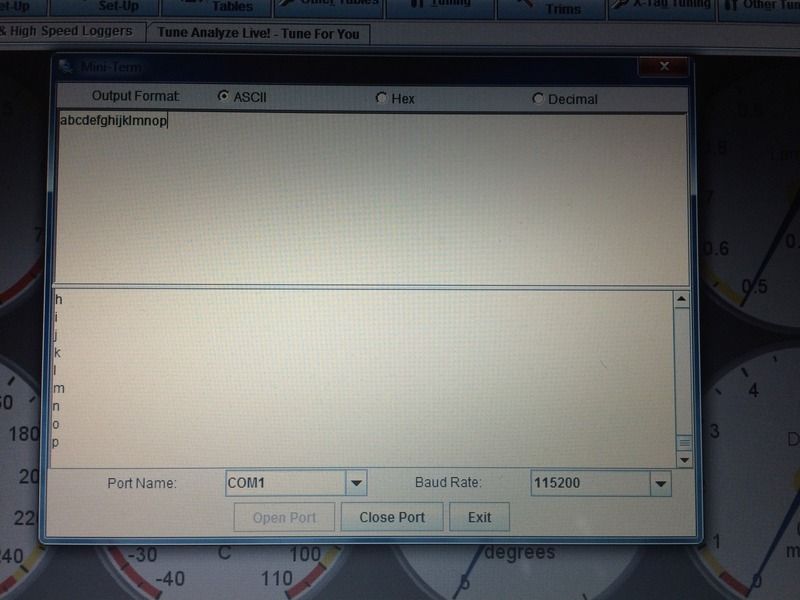
I would then try going to Tunerstudio, Communications, Mini Terminal. Select the Com port that corresponds with the one you noted earlier and then click open port. Now bridge the top 2 connections on the serial cable jack (With the Jack not plugged into the Microsquirt ECU) and type on the top window in the mini terminal. Does the bottom window of Mini Terminal mirror the text you typed in the top one?
If it does we can look at some other things. Let me know how you get on.
Cheers,
Hec
I to am in the throws of a similar problem. I would suggest the first port of call is http://www.useasydocs.com/details/connect.htm
I may learn otherwise, but in my case I am fairly confident that I have ruled out the computer being the issue. I must stress I am certainly not an expert on Microsquirt, I am a complete beginner. My unit connected fine for over a year but suddenly there is no connection on any of the three computers I have tried. I have spent a good few hours over the last week researching this problem on the forum so hopefully I can save you a bit of time.
I am not sure how you are around a computer. I am assuming given the age of the machine your running XP. I personally would turn of the computer, plug in the serial cable and turn the machine back on. The go to Control Panel and device manager. Go to the "Ports" list and check that the machine is recognising the serial port. Normally if there was a problem with the device or driver there would be a exclamation mark with a yellow background.
Assuming there is a serial port recognised, right click on the serial port and go down to properties, port settings, advanced it will tell you what the Com port is for that device. Make a mental note of this and come out of device manager and control panel.
I would then try going to Tunerstudio, Communications, Mini Terminal. Select the Com port that corresponds with the one you noted earlier and then click open port. Now bridge the top 2 connections on the serial cable jack (With the Jack not plugged into the Microsquirt ECU) and type on the top window in the mini terminal. Does the bottom window of Mini Terminal mirror the text you typed in the top one?
If it does we can look at some other things. Let me know how you get on.
Cheers,
Hec
Re: connection help!
Ok, Ive got the lead plugged into the serial port on the back of the laptop (running win7 btw), bridged the top two conections with a paperclip and typed the alphabet. Top half of the screen the charachters read from left to right as I typed, but the bottom half read from top to bottom
Ive got a 12v drain somewhere too, left the bike for 2 days and the batterys is dead as a dodo. I think ive got the injectors wired back to front...
Ive got a 12v drain somewhere too, left the bike for 2 days and the batterys is dead as a dodo. I think ive got the injectors wired back to front...
Re: connection help!
Sucess!!
Disconnected and unplugged all the sensors and threw a 12v feed directly onto the battery and hey presto! It connected. Plugged everything back on one by one and it disconnects itself when the GM MAP sensor is plugged back in. Must be duff or ive wired it back to front, Also my injectors started clicking away when i plugged those back in so they MUST be wired back to front.
Hopefully have the motor turning over this weekend or at least before I go awy to the TT
Disconnected and unplugged all the sensors and threw a 12v feed directly onto the battery and hey presto! It connected. Plugged everything back on one by one and it disconnects itself when the GM MAP sensor is plugged back in. Must be duff or ive wired it back to front, Also my injectors started clicking away when i plugged those back in so they MUST be wired back to front.
Hopefully have the motor turning over this weekend or at least before I go awy to the TT
Re: connection help!
Awesome mate well done. I resolved my connection problems also, well I say I, in actual fact It was repaired but the cause for a burnt earth trace (from the serial chip I think).
Cheers
Hec
Cheers
Hec